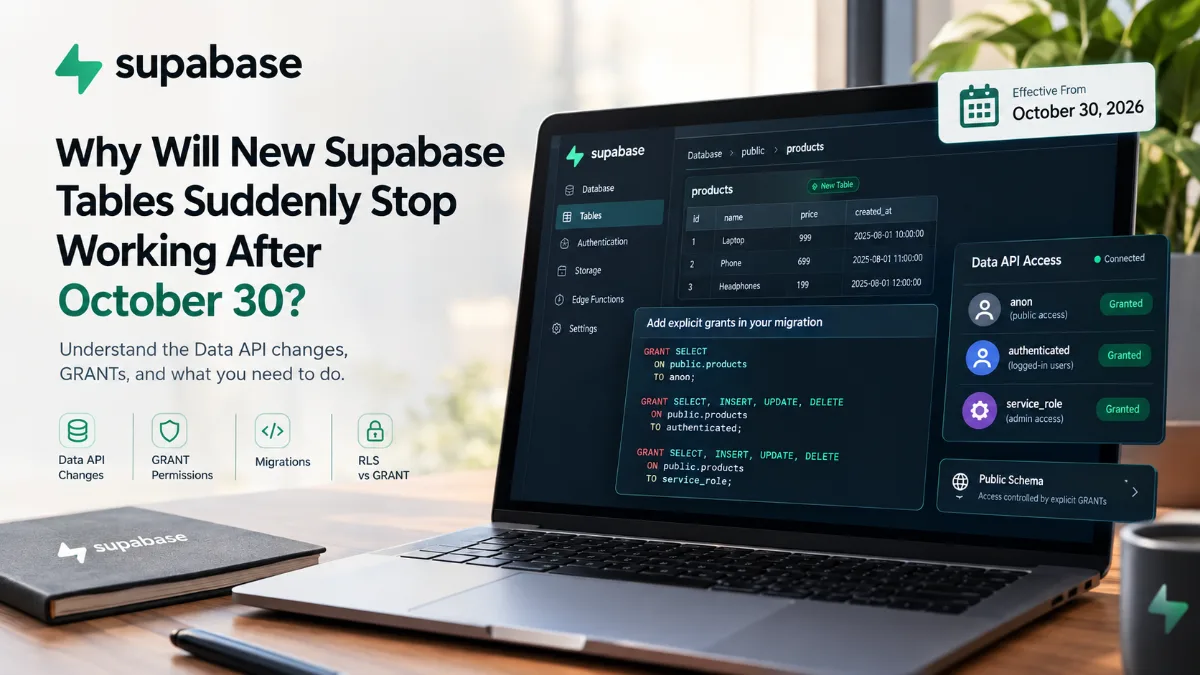
अगर आप Supabase + Next.js, supabase-js, PostgREST या GraphQL इस्तेमाल करते हैं, तो 30 अक्टूबर 2026 की यह platform change आपके लिए important है।
लेकिन सबसे पहले एक अच्छी खबर:
आपकी existing tables अचानक बंद नहीं होंगी।
Supabase के अनुसार existing projects में पहले से मौजूद tables अपने current grants बनाए रखेंगी और Data API के जरिए accessible रहेंगी। बदलाव मुख्य रूप से नई tables पर लागू होगा।
🚨 असल में बदल क्या रहा है?
पहले existing Supabase projects में public schema में नई table बनाने पर Data API access के लिए default privileges automatically मिल जाते थे।
यानी आप migration में सिर्फ:
create table public.products (
  id bigint generated by default as identity primary key,
  name text
);
लिखते थे और table Data API के जरिए accessible हो जाती थी।
अब नया behavior यह है:
CREATE TABLE
     ↓
Table successfully created
     ↓
Explicit GRANT?
   ↙       ↘
 YES        NO
 ↓           ↓
API access   API access denied
नई public table को Data API के जरिए accessible बनाने के लिए appropriate PostgreSQL grants explicitly देने होंगे।
📅 30 अक्टूबर 2026 को क्या होगा?
Supabase ने इस change को phased rollout में लागू किया है।
| तारीख | क्या हुआ/होगा |
|---|---|
| 28 Apr 2026 | New projects के लिए opt-in behavior उपलब्ध हुआ |
| 30 May 2026 | New projects के लिए नया behavior default हुआ |
| 30 Oct 2026 | Existing projects पर नया behavior लागू होगा |
इसलिए अगर आपका existing Supabase project आज normal तरीके से काम कर रहा है, तो इसका मतलब यह नहीं कि आपको future migrations में कुछ करने की जरूरत नहीं है।
30 अक्टूबर के बाद बनाई जाने वाली नई tables के लिए explicit grants महत्वपूर्ण होंगे।
✅ Existing Tables का क्या होगा?
यही सबसे important point है।
अगर आपकी database में आज ये tables हैं:
users
products
orders
blogs
inventory
payments
तो सिर्फ इस platform change की वजह से इन existing tables के grants हटाए नहीं जाएंगे।
Supabase के अनुसार existing objects अपने current grants बनाए रखते हैं। इसलिए केवल इस change के कारण आपका existing application अचानक बंद नहीं होगा।
लेकिन...
अगर कल आप नई table बनाते हैं:
reviews
और migration में required grants नहीं हैं, तो table database में successfully create हो सकती है लेकिन Data API के जरिए accessible नहीं होगी।
🧩 Data API आखिर है क्या?
Supabase में database तक पहुंचने के कई तरीके हैं।
Data API layer के जरिए PostgreSQL tables को REST और GraphQL interfaces के माध्यम से access किया जा सकता है। supabase-js भी Data API का इस्तेमाल करता है।
इसलिए अगर आपका Next.js code कुछ ऐसा करता है:
const { data } = await supabase
  .from("products")
  .select("*");
तो यह change आपके लिए relevant है।
वहीं अगर आपका application database से direct PostgreSQL connection के जरिए बात करता है—जैसे direct connection string के साथ ORM या psql—तो यह specific Data API exposure change उस access path को प्रभावित नहीं करता।
🔐 GRANT और RLS एक ही चीज नहीं हैं
यह distinction बहुत important है।
कई developers सोच सकते हैं:
“मेरी table पर RLS enabled है, तो Data API access automatically ठीक रहेगा।”
ऐसा नहीं है।
PostgreSQL में दो अलग layers हैं:
GRANT
  ↓
क्या यह role table पर operation कर सकता है?
  ↓
RLS Policy
  ↓
कौन-सी rows access कर सकता है?
Supabase documentation के अनुसार grants table-level access तय करते हैं, जबकि RLS policies row-level access control करती हैं। दोनों की जरूरत हो सकती है।
👤 anon, authenticated और service_role क्या हैं?
Supabase इन PostgreSQL roles का उपयोग Data API access control में करता है:
| Role | सामान्य उपयोग |
|---|---|
anon |
Signed-out/public requests |
authenticated |
Logged-in users |
service_role |
Elevated server-side access |
Supabase के अनुसार authenticated request authenticated role के साथ और unauthenticated request anon role के साथ operate करती है। service_role elevated access देता है और RLS bypass कर सकता है, इसलिए इसे client-side code में expose नहीं करना चाहिए।
🛠️ Migration में GRANT कैसे जोड़ें?
मान लीजिए आपकी migration एक नई products table बनाती है:
create table public.products (
  id bigint generated by default as identity primary key,
  name text not null,
  price numeric
);
अब उसी migration में required access explicitly define किया जा सकता है।
उदाहरण:
grant select
on public.products
to anon;

grant select, insert, update, delete
on public.products
to authenticated;

grant select, insert, update, delete
on public.products
to service_role;
Supabase भी explicit grants को least-privilege approach के साथ इस्तेमाल करने की सलाह देता है।
⚠️ हर Table को हर Role के लिए Full Access मत दें
ऊपर वाला example केवल समझाने के लिए है।
Real application में यह तय करें कि कौन वास्तव में क्या कर सकता है।
उदाहरण:
Public blog
grant select
on public.blogs
to anon, authenticated;
लेकिन anonymous users को:
INSERT
UPDATE
DELETE
देने की जरूरत नहीं हो सकती।
User orders
हो सकता है:
anon          → no access
authenticated → limited operations
service_role  → server-side operations
यानी नया system आपको explicit access control design करने के लिए मजबूर करता है।
और यही इस change का बड़ा architectural benefit है: table बनाते समय यह स्पष्ट करना पड़ता है कि Data API से कौन-सा role क्या कर सकता है।
🧱 Migration में GRANT रखना क्यों जरूरी है?
मान लीजिए आपने local development में table बनाई:
create table products...
Local environment में सब ठीक चलता है।
फिर GitHub से production migration चलती है।
अगर migration में GRANT नहीं है:
Migration
   ↓
CREATE TABLE ✓
   ↓
GRANT missing
   ↓
Data API cannot access table
   ↓
Application error
इसीलिए Supabase की recommendation है कि table बनाने वाली migration में ही उसके required grants रखें। यह approach new projects, preview branches और local database reset जैसे workflows में consistency बनाए रखने में मदद करती है।
💥 Error कैसा दिखाई देगा?
अगर required grant missing है, तो Data API permission error दे सकता है।
Supabase का documented example इस तरह का है:
permission denied for table your_table
और response में required GRANT statement का hint भी दिया जा सकता है, जैसे:
GRANT SELECT ON public.your_table TO anon;
यह अच्छी बात है क्योंकि error सिर्फ “कुछ गलत है” नहीं कहता—वह missing privilege identify करने में मदद कर सकता है।
🔎 अपने Supabase Project में क्या Check करें?
Supabase dashboard में Data API settings देखकर आप review कर सकते हैं कि कौन-सी tables/functions API के लिए exposed हैं।
Supabase Security Advisor भी affected tables को identify करने में मदद कर सकता है और remediation information दिखा सकता है।
आपको खास तौर पर इन चीजों को review करना चाहिए:
| Check | क्या देखें |
|---|---|
public tables |
कौन-सी tables API से accessible हैं |
| Grants | anon, authenticated, service_role permissions |
| RLS | Policies सही हैं या नहीं |
| Migrations | नई tables के साथ grants मौजूद हैं या नहीं |
| Preview branches | Schema migrations consistent हैं या नहीं |
| Local reset | supabase db reset के बाद API access काम करता है या नहीं |
🧠 एक Common Mistake
यह migration:
create table public.customers (
  id bigint primary key,
  name text
);
अकेली छोड़ना future behavior में पर्याप्त नहीं हो सकता अगर application उस table को Data API के जरिए access करती है।
बेहतर approach:
create table public.customers (
  id bigint primary key,
  name text
);

— Explicit Data API access
grant select
on public.customers
to anon;

grant select, insert, update, delete
on public.customers
to authenticated;

grant all
on public.customers
to service_role;
और इसके साथ RLS + appropriate policies भी design करें। Grant अकेला application security model नहीं है।
🧑💻 Next.js + Supabase Developers के लिए इसका क्या मतलब है?
अगर आपका stack कुछ ऐसा है:
Next.js
   ↓
supabase-js
   ↓
Supabase Data API
   ↓
PostgreSQL
तो future database migrations में एक नया habit बनाना अच्छा रहेगा:
CREATE TABLE
      ↓
ENABLE RLS
      ↓
CREATE POLICIES
      ↓
GRANT required privileges
इससे database schema और API access एक ही migration में documented रहते हैं।
🚀 Final Takeaway
Supabase का यह change existing applications को अचानक तोड़ने के लिए नहीं है।
Existing tables अपने current grants के साथ बनी रहेंगी।
लेकिन 30 अक्टूबर 2026 से existing projects में नई public tables को Data API access automatically नहीं मिलेगा। Explicit grants required होंगे।
इसलिए अगर आप Supabase पर actively development कर रहे हैं, तो अभी से अपनी migrations को इस pattern के साथ लिखना शुरू करें:
CREATE TABLE
      ↓
RLS
      ↓
Policies
      ↓
Explicit GRANT
      ↓
Data API
और सबसे important बात:
GRANT access देता है। RLS उस access को rows के स्तर पर control करता है