अगर आप Next.js application में YouTube videos, RSS feeds, external APIs या scheduled content को automatically sync करना चाहते हैं, तो सबसे straightforward solution अक्सर vercel.json में Vercel Cron Jobs configure करना होता है।
लेकिन Hobby plan पर हर 15 या 30 मिनट में चलने वाला Cron configure करने पर deployment के दौरान ऐसा error मिल सकता है:
❌ Vercel - Deployment failed.

Error: Hobby accounts are limited to daily cron jobs.
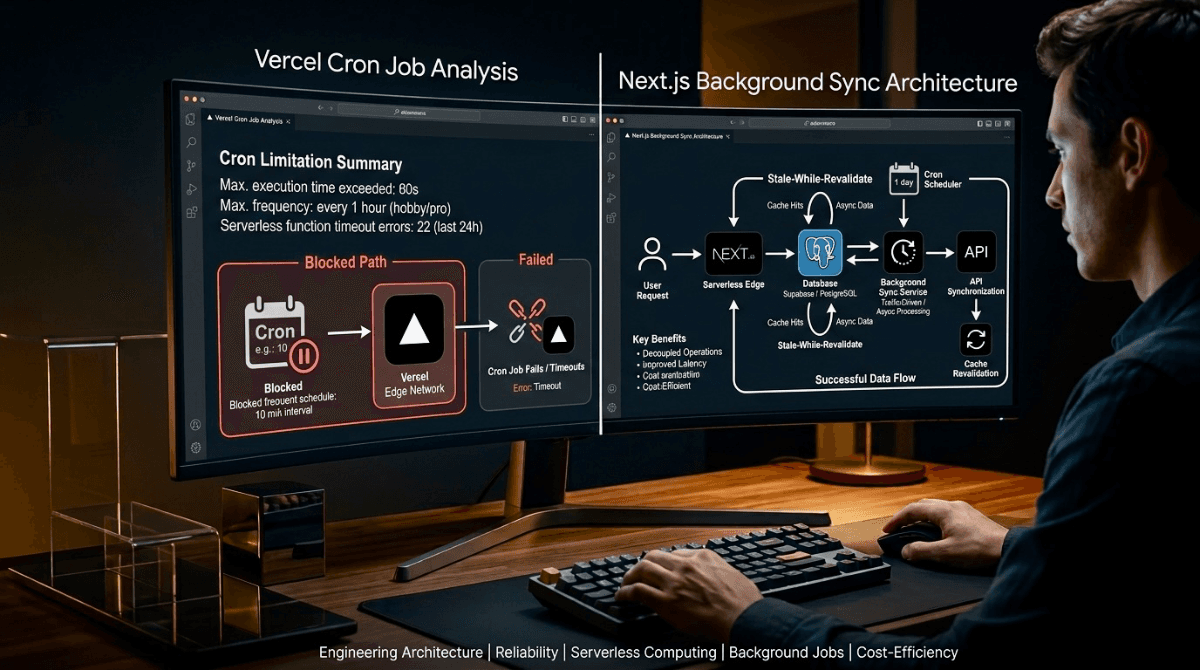
This cron expression would run more than once per day.Vercel की current Cron documentation के अनुसार Hobby plan पर Cron Jobs को daily schedule तक सीमित किया गया है, जबकि Pro और Enterprise plans अधिक frequent schedules support करते हैं। :contentReference[oaicite:1]{index=1}
लेकिन इसका मतलब यह नहीं है कि छोटे projects को हर 30 मिनट में data freshness maintain करने के लिए तुरंत paid plan लेना ही पड़ेगा। अगर आपकी application में continuous background execution की आवश्यकता नहीं है, तो एक traffic-driven background synchronization architecture बेहतर विकल्प हो सकता है।
1. यह Vercel Cron Error क्यों आता है?
मान लीजिए आपके vercel.json में यह configuration है:
{
  "crons": [
    {
      "path": "/api/cron/sync-content",
      "schedule": "*/30 * * * *"
    }
  ]
}/30 * का अर्थ है कि endpoint लगभग हर 30 मिनट में invoke होगा। Hobby plan पर इस तरह का sub-daily schedule allowed नहीं है, इसलिए deployment configuration validation के दौरान reject हो सकती है। :contentReference[oaicite:2]{index=2}
Hobby → Daily Cron
Pro / Enterprise → More frequent Cron schedules
2. Quick Fix: vercel.json को Daily Schedule पर रखें
अगर आपको Vercel deployment तुरंत unblock करना है, तो Cron को daily schedule पर बदलें:
{
  "crons": [
    {
      "path": "/api/cron/sync-content",
      "schedule": "0 0 * * *"
    },
    {
      "path": "/api/cron/publish-scheduled",
      "schedule": "0 1 * * *"
    }
  ]
}इससे Vercel Hobby की daily scheduling restriction के अनुरूप configuration बन जाती है। Vercel Cron Jobs का सामान्य उद्देश्य third-party APIs को trigger करना, backups चलाना, notifications भेजना और अन्य scheduled workflows execute करना है। :contentReference[oaicite:3]{index=3}
3. लेकिन अगर Data हर 30 मिनट में Fresh चाहिए तो?
यहीं traditional Cron और traffic-driven synchronization के बीच फर्क आता है।
अगर आपकी website पर पूरे दिन कोई visitor नहीं आता, तो हर 30 मिनट में external API को hit करने का कोई खास फायदा नहीं है। लेकिन जैसे ही visitor, application request या crawler आपकी content layer को access करता है, application यह check कर सकती है:
“क्या हमारा stored data निर्धारित freshness window से पुराना है? अगर हाँ, तो response को unnecessarily block किए बिना background में synchronization शुरू करें।”
इस approach में 30 मिनट का मतलब guaranteed wall-clock execution interval नहीं है। इसका मतलब है कि जब application को request मिलती है, तब वह देखती है कि data कितने समय से stale है। इसलिए इसे “30-minute freshness window” समझना ज्यादा सही है।
4. Recommended Architecture: Stale-While-Revalidate + Background Execution
इस architecture का basic flow है:
[Visitor / Crawler Request]
            |
            v
      [Read Database]
            |
            v
   [Is Data Stale?]
       /          \
     No            Yes
      |             |
      v             v
 Return Data   Acquire DB Lock
                    |
                    v
            Background Sync
                    |
          +---------+---------+
          |                   |
      Fetch API          Upsert DB
          |                   |
          +---------+---------+
                    |
                    v
Revalidate Cacheइसका सबसे बड़ा फायदा यह है कि user को external API fetch के लिए इंतजार नहीं करना पड़ता। पहले से उपलब्ध data तुरंत serve किया जा सकता है, जबकि refresh process background में शुरू होती है।
5. सिर्फ In-Memory Mutex क्यों पर्याप्त नहीं है?
एक common implementation इस तरह की होती है:
let isSyncing = false;

if (isSyncing) return;

isSyncing = true;Local development में यह ठीक लग सकता है, लेकिन distributed/serverless environment में इसे global lock समझना सुरक्षित नहीं है। अलग-अलग function instances के पास अलग-अलग memory हो सकती है। इसलिए दो concurrent requests अलग instances पर जाकर दोनों synchronization शुरू कर सकती हैं।
Production architecture में concurrency control के लिए database-backed lock, atomic update या distributed coordination mechanism ज्यादा reliable approach है।
6. Database-Backed Sync Lock
मान लीजिए आपकी database में एक sync-state record है:
sync_key
last_started_at
last_completed_at
statusApplication पहले atomic operation के जरिए lock acquire करने की कोशिश कर सकती है। केवल एक request को synchronization शुरू करने की अनुमति मिलेगी।
const STALE_AFTER = 30 * 60 * 1000;

export async function shouldStartSync() {
  const state = await getSyncState();

  const now = Date.now();

  if (
    state.status === "running" ||
    now - state.lastCompletedAt < STALE_AFTER
  ) {
    return false;
  }

  return await acquireDistributedLock();
}यहाँ acquireDistributedLock() को database transaction, atomic update या आपके chosen storage provider की locking capability के आधार पर implement करना चाहिए।
7. User Response को Block किए बिना Background Work
Vercel Functions में waitUntil() asynchronous work को response भेजने के बाद function lifecycle के दौरान continue करने के लिए इस्तेमाल किया जा सकता है। Vercel इसे logging, analytics और cache/database updates जैसे post-response tasks के लिए document करता है। :contentReference[oaicite:4]{index=4}
import { waitUntil } from "@vercel/functions";

export async function GET() {
  const data = await getLatestContent();

  if (isStale(data)) {
    waitUntil(syncLatestContent());
  }

  return Response.json(data);
}इस pattern का उद्देश्य user-facing response को external API synchronization से अलग रखना है। हालांकि background task को भी execution limits, failures और retries के लिए properly design करना चाहिए।
8. Sync Complete होने के बाद Cache Revalidation
नई information database में successfully save होने के बाद Next.js cache को invalidate किया जा सकता है। उदाहरण:
import { revalidatePath } from "next/cache";

await syncLatestContent();

revalidatePath("/videos");
revalidatePath("/articles");
revalidatePath("/sitemap.xml");
revalidatePath("/");revalidatePath() Next.js में किसी route के cached data को revalidate करने के लिए इस्तेमाल किया जा सकता है। :contentReference[oaicite:5]{index=5}
9. पूरा Traffic-Driven Sync Flow
Request
   ↓
Read existing database data
   ↓
Check freshness timestamp
   ↓
Data fresh?
 ┌───────────────┐
 │ Yes           │ No
 ↓               ↓
Return data      Try distributed lock
                 ↓
              Lock acquired?
              ┌──────────────┐
              │ No           │ Yes
              ↓              ↓
          Return data     waitUntil()
                            ↓
                       Fetch API
                            ↓
                       Validate data
                            ↓
                       Upsert database
                            ↓
                     revalidatePath()
                            ↓
Release lock10. कौन-सा Approach कब चुनें?
| Approach | Best For | Main Limitation |
|---|---|---|
| Vercel Hobby Cron | Daily jobs | Sub-daily schedules allowed नहीं |
| Vercel Pro Cron | Reliable scheduled execution | Paid plan और usage cost |
| Traffic-Driven SWR | Content और low/medium traffic applications | No traffic = no refresh trigger |
| External Scheduler | True periodic execution without Vercel Cron | External service और endpoint security manage करनी होगी |
| Queue / Workflow Architecture | Critical और long-running background processing | Architecture ज्यादा complex हो सकती है |
11. सबसे Important Trade-Off
यह समझना जरूरी है कि “Free 30-minute sync” और “guaranteed every-30-minute execution” एक ही चीज नहीं हैं।
Traffic-driven SWR architecture में application data को 30-minute freshness window के आधार पर refresh कर सकती है। लेकिन अगर application पर कोई request ही नहीं आती, तो sync trigger करने वाला event भी नहीं होगा।
अगर आपका business requirement है:
- हर 15 मिनट में job जरूर चले
- चाहे website पर कोई visitor हो या नहीं
- job failure पर retries चाहिए
- background processing guaranteed चाहिए
तो आपको एक वास्तविक scheduler, queue या workflow system इस्तेमाल करना चाहिए। केवल incoming web requests पर निर्भर architecture उस requirement को guarantee नहीं करता।
12. Final Engineering Recommendation
अगर आपका project एक content portal, dashboard, personal SaaS या low-to-medium traffic application है, तो हर छोटी background refresh के लिए paid Cron infrastructure जोड़ना जरूरी नहीं है।
एक practical architecture हो सकता है:
Next.js
   +
Database
   +
Stale-While-Revalidate
   +
waitUntil()
   +
Database-backed Lock
   +
revalidatePath()इससे user को cached data तुरंत मिल सकता है और stale होने पर synchronization background में शुरू किया जा सकता है।
🎯 Conclusion
Vercel Hobby की Cron restriction को केवल limitation समझने के बजाय इसे architecture decision के रूप में देखना ज्यादा बेहतर है।
vercel.jsonमें Hobby-compatible daily Cron रखें।- जहाँ guaranteed scheduling की जरूरत नहीं है, वहाँ traffic-driven Stale-While-Revalidate architecture इस्तेमाल करें।
- Concurrent requests को रोकने के लिए सिर्फ in-memory boolean पर निर्भर न रहें; production में database-backed locking या distributed coordination इस्तेमाल करें।
- Post-response work के लिए Vercel का
waitUntil()उपयोग किया जा सकता है। - Successful synchronization के बाद Next.js cache को
revalidatePath()से refresh करें।
सबसे महत्वपूर्ण बात: अगर आपको “हर 30 मिनट में हमेशा चलना ही चाहिए” जैसी hard guarantee चाहिए, तो request-driven SWR इसका replacement नहीं है। लेकिन अगर आपका लक्ष्य है कि जब application वास्तव में उपयोग हो रही हो तब data reasonably fresh रहे, तो यह एक lightweight और cost-efficient architecture हो सकता है।