"It works on my machine!" is one of the most recognizable sentences in software engineering — and one of the clearest signs that a project may lack reliable validation.
A web application can run perfectly on a developer's machine and still fail when it reaches a different environment. A missing import, a TypeScript mismatch, an invalid configuration, or a production-only build problem can suddenly turn a successful local development session into a failed deployment.
The question is simple:
How do you automatically catch these problems before they reach production?
This is where the concept of a CI Gate becomes important.
A CI Gate is an automated quality checkpoint that verifies code against predefined checks before allowing it to move to the next stage of the development or deployment workflow.
🧠 Understand CI Gates Through a Universal Example
Imagine a factory that has finished manufacturing a new product.
The product is not immediately shipped to customers. It first passes through several quality-control checkpoints.
Product Finished
       ↓
Quality Inspection
       ↓
Specification Check
       ↓
Final Test
       ↓
Everything Passed?
     ↙       ↘
   Yes        No
    ↓          ↓
Delivery Fix RequiredIf a problem is discovered, the product is stopped before it reaches the customer.
A CI pipeline applies the same principle to software.
The product is your code, while automated CI checks act as the quality checkpoints.
🚦 What Exactly Is a CI Gate?
CI stands for Continuous Integration. In practical terms, it means continuously integrating changes into a shared codebase while automatically validating those changes.
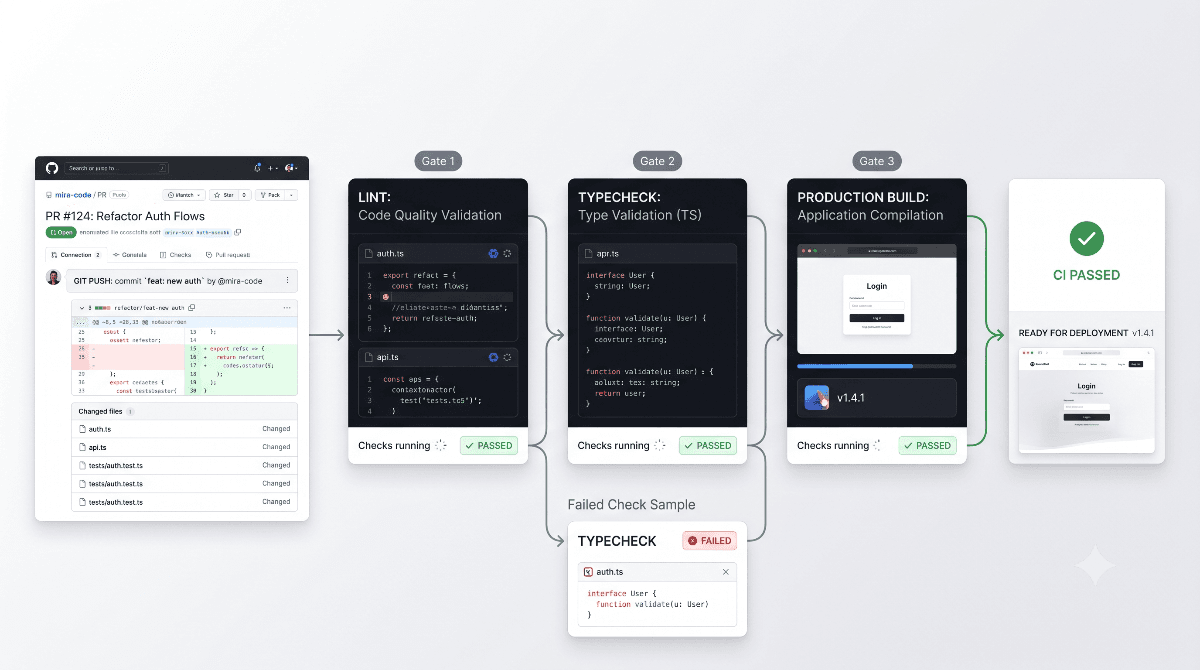
When a developer pushes code or opens a Pull Request, a CI system can create a clean execution environment, check out the repository, install dependencies, and run a predefined validation pipeline.
A basic web-development pipeline might look like this:
Git Push / Pull Request
          ↓
   Fresh CI Environment
          ↓
      Gate 1: Lint
          ↓
    Gate 2: Typecheck
          ↓
 Gate 3: Production Build
          ↓
       All Passed?
        ↙       ↘
      Yes        No
       ↓          ↓
 Continue      Stop / Fix
       ↓
Merge / DeployThe important point is that CI does not magically prove that the application is bug-free. Instead, it automatically verifies a defined set of conditions that can be checked reliably.
🧱 The Three Core CI Gates
| Gate | Main Question | What It Validates |
|---|---|---|
| Lint | Does the code violate configured quality rules? | Code quality and common problematic patterns |
| Typecheck | Are the data types and contracts consistent? | Compile-time type correctness |
| Production Build | Can the application successfully produce a production build? | Compilation and integration-level build validation |
1️⃣ Gate One: Lint — The Code Quality Inspector
Think of linting as a quality inspector for source code.
A linter analyzes code according to the rules configured for the project and can identify many common mistakes, unwanted patterns, and consistency issues.
Depending on the project's configuration, linting can catch things such as:
- Unused variables
- Problematic coding patterns
- React-specific rule violations
- Unwanted or inconsistent patterns
- Project-specific coding standards
A typical project may expose the check through:
npm run lintIf a configured rule reports an error, the CI workflow can stop at this stage instead of allowing the change to continue.
Linting does not prove that an application is bug-free. It validates the source code against the rules defined by the project's linting configuration.
2️⃣ Gate Two: Typecheck — The Logical Validator
Passing lint checks does not necessarily mean that the code's data contracts are correct.
This is where TypeScript type checking becomes valuable.
Consider a simple function:
function calculatePrice(price: number) {
  return price * 2;
}The function expects a number. Passing a string such as:
calculatePrice("500");creates a type mismatch that TypeScript can identify during development or CI rather than leaving the problem to appear later at runtime.
Typechecking can also validate relationships between:
- Function parameters
- API response types
- Component props
- Object properties
- Return values
- Shared data models
A common command is:
npx tsc --noEmitThe --noEmit option tells TypeScript to perform type checking
without producing JavaScript output files.
Typechecking verifies that different parts of the application agree on the shape and types of the data they exchange.
3️⃣ Gate Three: Production Build — The Integration Check
Now comes one of the most practical questions:
Can the entire application actually produce a production build?
In a Next.js project, this is commonly represented by:
npm run buildThe production build process compiles and bundles the application according to the framework and project configuration.
This stage can expose problems that may not appear during ordinary local development.
Examples include:
- Broken imports
- Compilation errors
- Invalid configuration
- Server and Client Component boundary problems
- Static generation failures
- Production-only build issues
This is why saying "the application works on localhost" is not enough to establish production readiness.
🔗 How the Three Gates Work Together
Each gate answers a different engineering question.
Lint
 │
 ├── "Does the code follow our configured rules?"
 │
 ↓
Typecheck
 │
 ├── "Are our types and contracts consistent?"
 │
 ↓
Production Build
 │
 ├── "Can the application compile for production?"
 │
 ↓
Next StageThis layered approach is powerful because a single check is never expected to validate everything.
🌍 Where GitHub Actions Fits In
One of the biggest advantages of CI is automation.
Developers do not need to manually run the complete validation process and then tell the rest of the team that everything passed.
A GitHub Actions workflow can execute the required checks automatically when a developer pushes code or opens a Pull Request.
Developer
   ↓
git push
   ↓
GitHub
   ↓
CI Workflow
   ↓
Install Dependencies
   ↓
Lint
   ↓
Typecheck
   ↓
Production Build
   ↓
Pass / FailThe result becomes a repeatable verification process rather than a personal promise that "it works on my computer."
🧪 Why a Fresh CI Environment Matters
A developer's machine contains many things that a clean CI environment may not.
For example:
- Local environment variables
- Previously installed dependencies
- Local caches
- Developer-specific configuration
- Locally running services
A clean CI environment helps expose hidden assumptions in the project.
If an application only works because of conditions that exist on one developer's machine, the development process is not fully reproducible.
🔐 CI Should Not Depend on Production Secrets Unnecessarily
A common mistake is to solve every CI problem by exposing production credentials to the CI environment.
That is not always necessary — and can introduce avoidable security and reliability concerns.
Where possible, automated validation should minimize unnecessary dependence on live production services.
For example, if a build only needs configuration to compile successfully, it should not necessarily need to make a real-time request to a production database.
Otherwise, a temporary external-service failure could turn into a CI failure even though the application code itself is valid.
🧠 A Realistic Engineering Scenario
Imagine a developer finishes a new feature.
Everything passes locally:
npm run lint       ✅
npm run typecheck  ✅
npm run build ✅The developer pushes the code.
The CI pipeline reports:
Lint       ✅
Typecheck  ✅
Build ❌At first, that failure may feel frustrating. But from an engineering perspective, it is exactly what the pipeline was designed to do.
Instead of discovering the problem after users encounter it in production, the team discovers it during the development workflow.
Move detectable failures closer to the moment when the code is introduced, rather than discovering them after deployment.
⚔️ GitHub CI vs Vercel: Aren't They Doing the Same Thing?
This is a common question in modern Next.js projects:
"If Vercel already builds my application, why should GitHub Actions run the build too?"
The answer is that the two systems can serve different purposes.
| Area | GitHub Actions CI | Vercel |
|---|---|---|
| Primary Role | Validation and workflow automation | Deployment, hosting and delivery |
| Typical Trigger | Push / Pull Request | Configured deployment workflow |
| Main Goal | Verify code before it moves forward | Build, deploy and serve the application |
| Failure Impact | Can block or flag the development workflow | Can cause a deployment to fail |
The simplest mental model is:
CI Gate = Quality Checkpoint
Vercel = Deployment & Delivery Platform
They can therefore complement each other rather than being redundant.
🏭 Think About the Entire Pipeline Like a Factory
Now bring the factory analogy back into the complete software workflow:
Developer Writes Code
        ↓
   Software Pipeline
        ↓
┌───────────────────────┐
│ Gate 1: Lint          │
│ "Quality rules OK?"   │
└───────────────────────┘
        ↓
┌───────────────────────┐
│ Gate 2: Typecheck     │
│ "Types consistent?"   │
└───────────────────────┘
        ↓
┌───────────────────────┐
│ Gate 3: Build         │
│ "Production builds?"  │
└───────────────────────┘
        ↓
 Testing / Review
        ↓
    Deployment
        ↓
UsersIf a checkpoint fails, the change should be investigated and corrected before it continues through the pipeline.
📊 Which Gate Catches Which Kind of Problem?
| Example Problem | Likely Detection Stage |
|---|---|
| Unused variable | Lint |
| Incorrect TypeScript argument | Typecheck |
| Invalid property access | Typecheck |
| Broken import | Build |
| Framework compilation problem | Build |
| Production configuration problem | Build / CI Configuration |
These are not absolute boundaries. Depending on the tools and configuration, the same issue may be detected at more than one stage.
🚫 What CI Gates Do Not Guarantee
Passing Lint, Typecheck and Build does not mean that the application is completely bug-free.
These checks may not detect problems such as:
- Incorrect business logic
- Broken user experiences
- Unexpected runtime API failures
- Incorrect database data
- Authentication issues
- Security vulnerabilities outside the configured checks
- Visual regressions
Mature engineering teams can therefore extend the CI pipeline with additional layers such as unit tests, integration tests, end-to-end tests, security scanning, dependency checks and other project-specific validations.
🛡️ The Better Approach: Layered CI Validation
A strong engineering workflow should not treat a successful build as the definition of software quality.
A more complete pipeline might look like:
Code
 ↓
Lint
 ↓
Typecheck
 ↓
Unit / Integration Tests
 ↓
Production Build
 ↓
Security / Quality Checks
 ↓
Code Review
 ↓
DeployEach layer answers a different question.
Together, they create a much stronger confidence model than any single automated check could provide.
🎯 The Bigger Engineering Lesson
A CI Gate is not designed to make developers' lives harder.
It asks a much more useful question:
"Do we have enough automated evidence to confidently move this code to the next stage?"
Lint increases confidence in code quality and configured conventions.
Typecheck increases confidence in type contracts and data relationships.
Production Build increases confidence that the application can actually be compiled for its intended production environment.
Tests then provide another layer of confidence around expected behavior.
🏁 Final Takeaway
"It works on my machine" should never be the final validation strategy for a production application.
Modern software needs a repeatable way to verify changes before those changes move further through the delivery pipeline.
That is where a CI Gate becomes valuable.
At its simplest, it asks three important questions:
- Lint: Does the code violate our configured quality rules?
- Typecheck: Are our types and contracts consistent?
- Production Build: Can the application successfully produce its production build?
A CI Gate does not guarantee perfect software. It creates an automated checkpoint that catches detectable problems early, before they have a chance to become someone else's production problem.
Because good software engineering is not simply about writing code that works.
It is about building a system where code can be continuously verified, reproduced and delivered with confidence.