Google Antigravity 2.0 vs Antigravity IDE: Which AI Tool Should You Choose?
Google Antigravity 2.0 and Antigravity IDE bring agentic AI into software development from two different angles. Compare multi-agent orchestration, browser automation, direct coding, and hybrid workflows to find the right tool for your development style.
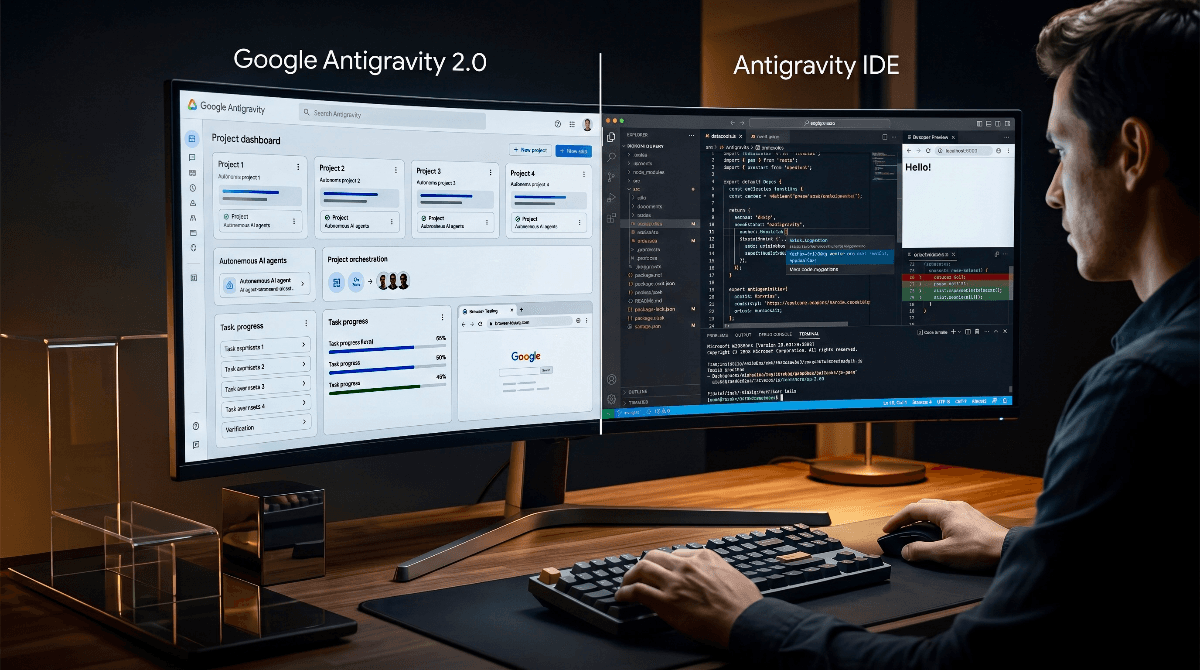
Software development is moving fromAI-assisted codingtowardagentic development.
Instead of simply suggesting the next line of code, modern AI agents can inspect a project, modify files, execute commands, interact with a browser, run tests, and report what they accomplished.
Google's Antigravity ecosystem takes this idea in two different directions:Antigravity 2.0is a standalone command center designed around managing agents, whileAntigravity IDEputs those agents directly inside a traditional development environment.
Both can be powerful. The real question is:
Do you want to orchestrate the work—or work directly inside the code?
Let's use a large e-commerce application as an example.
💻 1. Antigravity IDE: The Hands-On Developer Workbench
Antigravity IDEis designed for developers who still want the editor at the center of their workflow.
Google describes it as an agentic development environment where agents can operate across theeditor, terminal, and browser, while developers can use familiar IDE capabilities such as Agent and Tab.
🛒 The E-Commerce Example
Imagine you're building the product catalog for an Amazon-style marketplace.
You open your project and ask the agent:
“Build the product catalog with category filters, price sorting, and responsive cards.”
The agent can inspect the existing codebase, plan the work, modify files, use the terminal, and interact with the browser to verify the result.
But you're still inside your development environment.
If you want to manually change theBuy Nowbutton, inspect a component, debug a database call, or step through a particular piece of logic, the editor is immediately available.
Key Capabilities
| Capability | Why it matters |
|---|---|
| Editor + Agent | AI works alongside your normal coding workflow |
| Tab / Autocomplete | Useful for hands-on coding and smaller changes |
| Inline Diffs | Review granular changes before accepting them |
| Terminal Access | Agents can execute development commands |
| Browser Integration | Agents can test local web applications |
| Direct File Editing | Developers can inspect and modify the implementation themselves |
Google's current IDE extension documentation specifically highlights conversations, granular inline diffs, interactive plans, and multi-step engineering tasks.
🎯 Best For
Developers who want AI autonomy without giving up the traditional editor.
🤖 2. Google Antigravity 2.0: The Agent Command Center
Antigravity 2.0 takes a different approach.
Rather than making the editor the primary interface, Google describes 2.0 as astandalone desktop application for launching, monitoring, and orchestrating AI agents.
The emphasis shifts from:
“What line of code should I edit?”
to:
“What work should my agents complete?”
🛒 The E-Commerce Example
Suppose your company has three major engineering tasks:
- Build the main storefront.
- Create an automated email system.
- Modernize an existing user-data system.
Instead of manually moving between three development tasks, you can organize work into projects and run agents in parallel.
Antigravity 2.0 supports multiple agents, Projects spanning multiple folders, scoped permissions, dynamic subagents, artifacts, and scheduled tasks.
An agent can also interact with Chrome, allowing it to test web applications and produce screenshots or recordings as part of its verification workflow.
Key Capabilities
| Capability | Why it matters |
|---|---|
| Multi-Agent Workflows | Multiple agents can tackle different parts of a problem |
| Projects | Organize work across multiple folders and workspaces |
| Subagents | Delegate specialized pieces of larger tasks |
| Scheduled Tasks | Run recurring agent tasks using cron schedules |
| Artifacts | Review plans, deliverables, and agent progress |
| Browser Automation | Agents can interact with Chrome for verification |
| Scoped Permissions | Control what agents can access and do |
Google has also expanded Antigravity with CLI, SDK, API, custom agents, and other ecosystem components, making 2.0 less like a conventional IDE and more like anagent platform.
🎯 Best For
Developers, technical leads, and teams managing larger autonomous workflows.
📊 Antigravity 2.0 vs Antigravity IDE
| Feature | 🤖 Antigravity 2.0 | 💻 Antigravity IDE |
|---|---|---|
| Primary Focus | Agent orchestration | Hands-on development |
| Interface | Standalone agent-first application | Full development environment |
| Workspace Model | Projects, multiple folders/workspaces | Editor-centered workspace |
| Multi-Agent Work | Core feature | Available through agent capabilities, but editor remains central |
| Direct Code Editing | Agent-driven | Editor + agent-driven |
| Inline Coding | Not the primary experience | Yes |
| Diff Review | Artifact/change review | Granular inline diffs |
| Terminal | Agent-controlled workflows | Integrated terminal + agent |
| Browser Automation | Yes | Yes |
| Scheduled Tasks | Yes | Not the primary workflow |
| Best For | Autonomous orchestration | Interactive software development |
🌐 Browser Automation Changes the Game
One of Antigravity's most interesting capabilities is its browser integration.
The agent isn't limited to reading source code.
It can interact with a local Chrome browser, navigate pages, click elements, inspect results, and capture screenshots or recordings as artifacts.
For an e-commerce application, that means an agent can potentially perform a workflow such as:
That is fundamentally different from traditional autocomplete-based AI coding.
The AI isn't merely writing the implementation.
It can also participate inverification of the implementation.
🔄 The Best Workflow May Be to Use Both
Choosing between Antigravity 2.0 and Antigravity IDE doesn't necessarily have to be an either/or decision.
Google itself recommends using Antigravity 2.0 alongside an IDE. The company describes 2.0 as the future of its agent-first surface while keeping the IDE available for developers who need to inspect implementation details.
A practical workflow could look like this:
1. 🤖 Delegate Large Tasks
Use Antigravity 2.0 to define higher-level objectives.
For example:
“Build the complete product-catalog experience and verify the major user flows.”
2. 🔍 Review the Result
Use artifacts, plans, screenshots, and verification results to understand what the agent actually did.
3. 💻 Open the Code
When you need to inspect a specific component, debug logic, or make a precise change, move into the IDE.
4. 🧪 Verify Again
Let the agent run the relevant tests and browser workflows after your changes.
This creates a useful division:
Antigravity 2.0 = Orchestrate
Antigravity IDE = Inspect, edit, debug
🧠 So, Which One Should You Choose?
Choose Antigravity 2.0 if you:
- Work on multiple projects or workspaces.
- Want several agents working in parallel.
- Prefer high-level task delegation.
- Need scheduled or asynchronous workflows.
- Want a more agent-first interface.
- Spend more time managing outcomes than manually editing code.
Choose Antigravity IDE if you:
- Spend most of your day writing and reviewing code.
- Want direct access to files.
- Frequently make small manual changes.
- Depend heavily on autocomplete.
- Need interactive debugging and detailed code inspection.
- Prefer a traditional IDE workflow enhanced by AI.
Choose Both if you:
- Build complex applications.
- Want autonomous agents for large tasks.
- Still need precise control over implementation details.
- Move frequently between architecture and low-level debugging.
🚀 The Bigger Shift
The interesting part of Antigravity isn't simply that Google built another AI coding tool.
It is that theIDE itself is becoming less central to software development.
The traditional workflow looked like:
The agentic workflow increasingly looks like:
The developer moves one level higher.
Instead of manually controlling every operation, you increasingly define the outcome, provide constraints, review evidence, and intervene when necessary.
Google's current Antigravity ecosystem reflects this direction: standalone agent orchestration, CLI access, SDK/API capabilities, browser automation, scheduled tasks, subagents, and integrations with traditional editors.
🎯 Final Verdict
There isn't one universal winner.
Antigravity IDEis the better choice whenyou want to stay close to the code.
Antigravity 2.0is the better choice whenyou want to stay close to the outcome.
And for serious software projects, the most interesting workflow may be the combination of both:
Let agents handle the heavy work. Keep the IDE for the moments where human precision matters.
That's the real evolution from anAI coding assistantto anAI development environment.
On This Page
- 💻 1. Antigravity IDE: The Hands-On Developer Workbench
- 🛒 The E-Commerce Example
- Key Capabilities
- 🎯 Best For
- 🤖 2. Google Antigravity 2.0: The Agent Command Center
- 🛒 The E-Commerce Example
- Key Capabilities
- 🎯 Best For
- 📊 Antigravity 2.0 vs Antigravity IDE
- 🌐 Browser Automation Changes the Game
- 🔄 The Best Workflow May Be to Use Both
- 1. 🤖 Delegate Large Tasks
- 2. 🔍 Review the Result
- 3. 💻 Open the Code
- 4. 🧪 Verify Again
- Antigravity 2.0 = OrchestrateAntigravity IDE = Inspect, edit, debug
- 🧠 So, Which One Should You Choose?
- Choose Antigravity 2.0 if you:
- Choose Antigravity IDE if you:
- Choose Both if you:
- 🚀 The Bigger Shift
- 🎯 Final Verdict

Subscribe to One2Tech Insights
Stay updated with our latest development and tech guides.
More from Dev & AI
View all
How to Turn Your Android Phone into a Local Shared Drive Using Wi-Fi Hotspot
You can turn your Android phone into a local file-sharing server and access a specific folder from Windows, Mac, or other phones connected to its Wi-Fi hotspot.
The AI Triopoly: Unpacking the Dominance of Google, OpenAI, and Anthropic
The global AI landscape appears vast, but beneath the surface, a triopoly of Google, OpenAI, and Anthropic controls nearly 90% of frontier AI capabilities. This trio has built an impenetrable moat around the future of technology, making it mathematically improbable for new entrants to break in. In this article, we'll delve into the data-driven breakdown of how these three players established their structural monopoly and why it's so difficult to disrupt.