Why Will New Supabase Tables Suddenly Stop Working After October 30?
From October 30, 2026, new tables in Supabase's public schema will require explicit grants before the Data API can access them. Learn what changes, what stays safe, and how to update migrations.
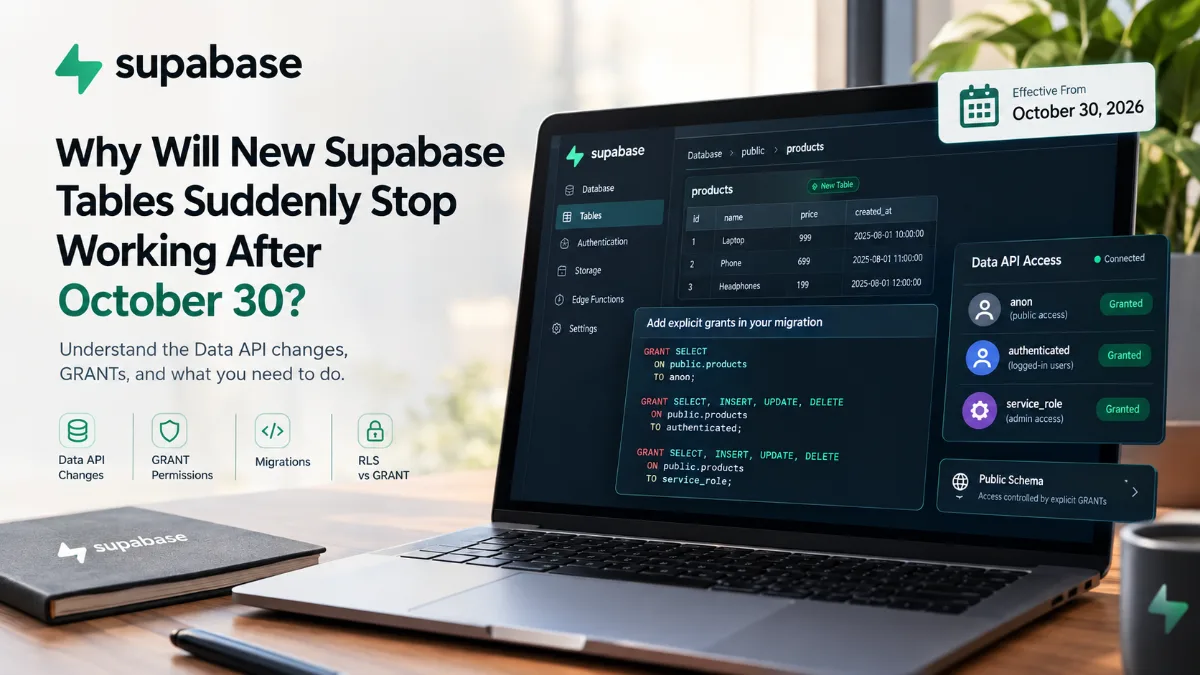
If you're building with Supabase + Next.js, supabase-js, PostgREST, or GraphQL, there is an important platform change you should understand before your next database migration.
The good news is that this is not an existing-table shutdown.
Supabase says existing tables in existing projects keep their current grants and remain accessible through the Data API. The important change applies to new tables created in the public schema after the new behavior reaches your project.
🚨 What Is Actually Changing?
Historically, new tables created in the public schema of existing projects could automatically receive default privileges that made them reachable through the Data API.
A migration like this could therefore be enough:
create table public.products (
  id bigint generated by default as identity primary key,
  name text
);
Under the new behavior, creating the table and exposing it through the Data API become two separate concerns:
CREATE TABLE
     ↓
Table exists
     ↓
Explicit GRANT?
   ↙       ↘
 YES        NO
 ↓           ↓
API access   Permission denied
New public-schema tables need the appropriate PostgreSQL grants before the Data API can access them.
📅 What Happens on October 30, 2026?
Supabase is rolling out this change in stages.
| Date | Milestone |
|---|---|
| April 28, 2026 | Opt-in behavior became available for new projects |
| May 30, 2026 | New behavior became the default for new projects |
| October 30, 2026 | New behavior is enforced across existing projects |
So an existing project that works perfectly today can still require changes to its future migrations.
From October 30, new tables created in public without the appropriate explicit grants will not be reachable through the Data API.
✅ What Happens to Existing Tables?
This is the part developers should understand first.
Suppose your project already contains:
users
products
orders
blogs
inventory
payments
The October 30 change does not automatically remove their existing grants.
Supabase explicitly states that existing objects retain their current grants and remain reachable.
But if you create this tomorrow:
reviews
and the migration doesn't grant the required privileges, the table can exist successfully in PostgreSQL while remaining inaccessible through the Data API.
🧩 What Is the Supabase Data API?
Supabase provides an API layer over PostgreSQL that can expose database objects through REST and GraphQL.
supabase-js uses the Data API to query and mutate PostgreSQL data.
For example:
const { data } = await supabase
  .from("products")
  .select("*");
If your application accesses tables this way, the new grant behavior matters.
However, if your application communicates with PostgreSQL through a direct database connection—such as an ORM or psql using a connection string—this specific Data API exposure change does not affect that connection path.
🔐 GRANT Is Not the Same as RLS
This is one of the most important concepts in the change.
Developers sometimes assume:
“My table has Row Level Security enabled, so API access is already handled.”
Not quite.
There are two separate permission layers:
GRANT
  ↓
Can this role perform the operation?
  ↓
RLS Policy
  ↓
Which rows can it actually access?
Supabase documentation explains that grants control whether a role can access a table at all, while RLS policies control which rows that role can access.
You should think about both.
👤 What Are anon, authenticated, and service_role?
Supabase maps requests to PostgreSQL roles.
| Role | Typical purpose |
|---|---|
anon |
Unauthenticated/public requests |
authenticated |
Signed-in users |
service_role |
Elevated server-side access |
An unauthenticated request generally operates as anon, while an authenticated request operates as authenticated.
service_role provides elevated access and bypasses RLS, so it must be kept in trusted server-side environments rather than exposed to browsers.
🛠️ How Should You Add GRANTs?
Suppose your migration creates:
create table public.products (
  id bigint generated by default as identity primary key,
  name text not null,
  price numeric
);
If your application needs the corresponding Data API access, define the privileges explicitly:
grant select
on public.products
to anon;

grant select, insert, update, delete
on public.products
to authenticated;

grant select, insert, update, delete
on public.products
to service_role;
Supabase recommends using explicit, least-privilege access rather than blindly exposing everything.
⚠️ Don't Give Every Role Full Access Automatically
The SQL above is an example—not a universal security policy.
Consider what the application actually needs.
For a public blog:
grant select
on public.blogs
to anon, authenticated;
There may be no reason for anonymous visitors to receive:
INSERT
UPDATE
DELETE
For an orders table, your model could instead be:
anon
    → no access

authenticated
    → limited user operations

service_role
    → trusted server-side operations
The important change is that access becomes an explicit architectural decision rather than an automatic side effect of creating a table.
🧱 Why Should GRANT Live Inside the Migration?
Consider this workflow:
Developer creates table
        ↓
Local testing works
        ↓
Migration committed
        ↓
Production migration runs
        ↓
CREATE TABLE ✓
        ↓
GRANT missing
        ↓
Data API fails
That's exactly the kind of problem you want to catch in the migration itself.
Keeping the required grants alongside the table creation makes your schema provisioning more predictable across production, preview branches, and local database resets.
💥 What Error Will You See?
When a required table privilege is missing, the Data API can return a PostgreSQL permission error such as:
permission denied for table your_table
Supabase documents that the response can also include a hint showing the missing grant, for example:
GRANT SELECT ON public.your_table TO anon;
That makes the error relatively actionable: the API can tell you which permission needs to be added.
🔎 What Should You Check in Your Supabase Project?
Open your project's Data API settings and review which tables and functions are exposed.
Supabase also provides Security Advisor information for tables affected by the change.
A useful review checklist:
| Area | What to verify |
|---|---|
public tables |
Which tables are API-accessible? |
| Grants | What can anon, authenticated, and service_role do? |
| RLS | Are the required policies enabled? |
| Migrations | Do new tables include explicit grants? |
| Preview branches | Do migrations behave consistently? |
| Local reset | Does supabase db reset reproduce the expected access? |
🧑💻 What Does This Mean for Next.js + Supabase?
If your architecture looks like:
Next.js
   ↓
supabase-js
   ↓
Supabase Data API
   ↓
PostgreSQL
then future migrations should treat API access as part of the schema design.
A useful migration pattern becomes:
CREATE TABLE
      ↓
ENABLE RLS
      ↓
CREATE POLICIES
      ↓
GRANT required privileges
Now the migration documents both:
What the database contains
and
Who can access it through the API.
🚀 Final Takeaway
The October 30 change is not about suddenly breaking existing Supabase tables.
Existing tables retain their current grants.
The important change is what happens when you create new tables in the public schema. From October 30, 2026, those tables will require explicit privileges before the Data API can reach them.
So if you're actively developing a Supabase application, make explicit grants part of your migration workflow:
CREATE TABLE
      ↓
RLS
      ↓
Policies
      ↓
Explicit GRANT
      ↓
Data API
And remember the distinction:
GRANT determines whether a role can access the table. RLS determines which rows that role can access.
Treat both as part of your database security architecture.
On This Page
- 🚨 What Is Actually Changing?
- 📅 What Happens on October 30, 2026?
- ✅ What Happens to Existing Tables?
- 🧩 What Is the Supabase Data API?
- 🔐 GRANT Is Not the Same as RLS
- 👤 What Are anon, authenticated, and service_role?
- 🛠️ How Should You Add GRANTs?
- ⚠️ Don't Give Every Role Full Access Automatically
- 🧱 Why Should GRANT Live Inside the Migration?
- 💥 What Error Will You See?
- 🔎 What Should You Check in Your Supabase Project?
- 🧑💻 What Does This Mean for Next.js + Supabase?
- What the database contains
- 🚀 Final Takeaway

Subscribe to One2Tech Insights
Stay updated with our latest development and tech guides.
More from Website Dev
View all
आपकी Next.js App Slow क्यों लगती है? इन 6 Architecture Decisions से फर्क पड़ता है
आपकी Next.js app modern होने के बावजूद slow महसूस हो सकती है। जानिए static rendering, caching, navigation, middleware और data architecture के 6 performance principles जो real-world speed को बेहतर बनाते हैं।
CI Gate क्या है? Lint, Typecheck और Build से Production तक Code की Quality कैसे तय होती है?
Code आपके machine पर चल रहा है, इसका मतलब यह production-ready है? समझिए CI Gate कैसे Lint, Typecheck और Build के जरिए broken code को production तक पहुँचने से पहले पकड़ता है।